YEAR:
April 2026
PROJECT:
Personal Project
TOOLS:
Illustrator, Figma & InDesign
Monsaic: Chronic Illness Management App


about.
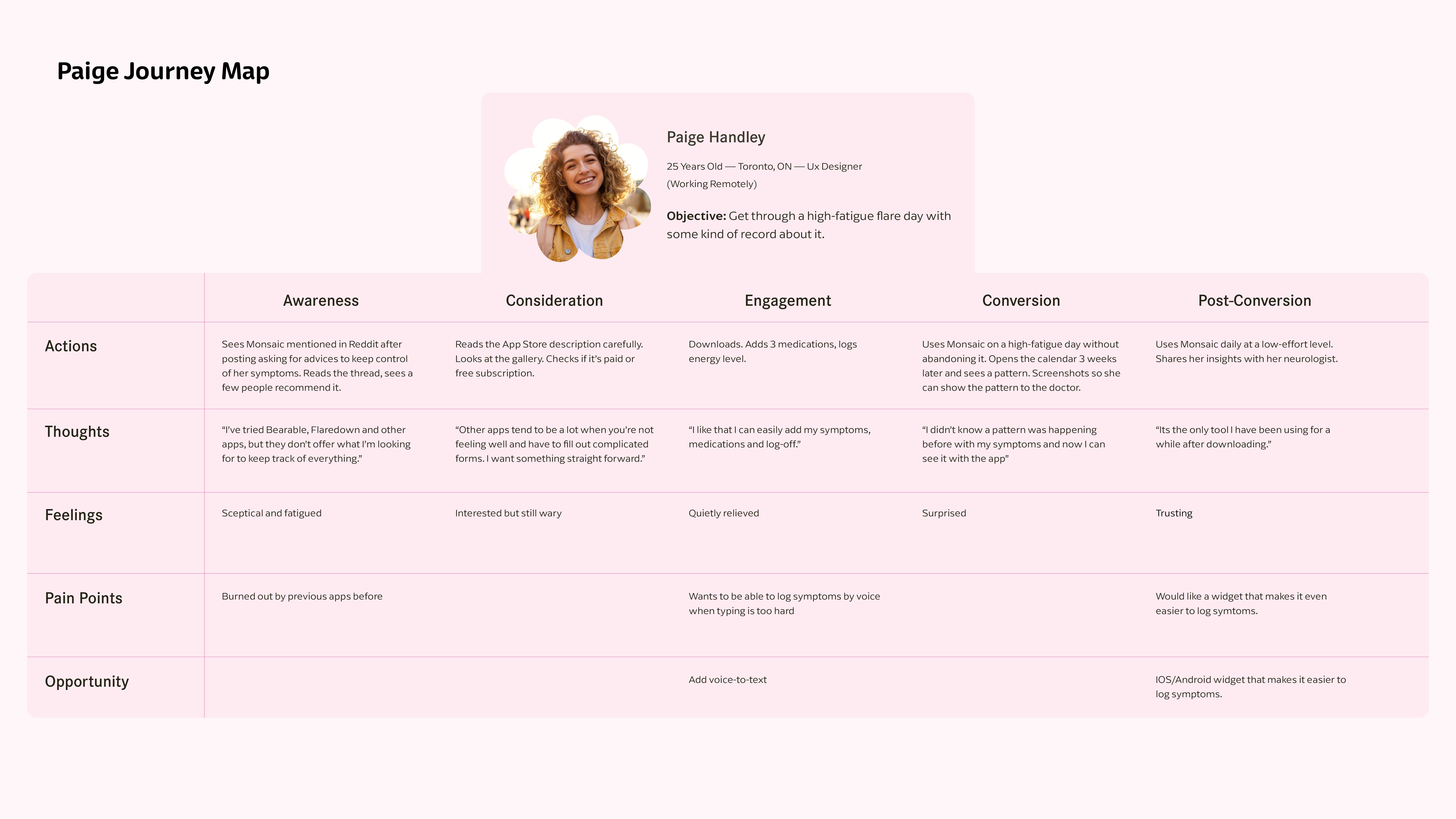
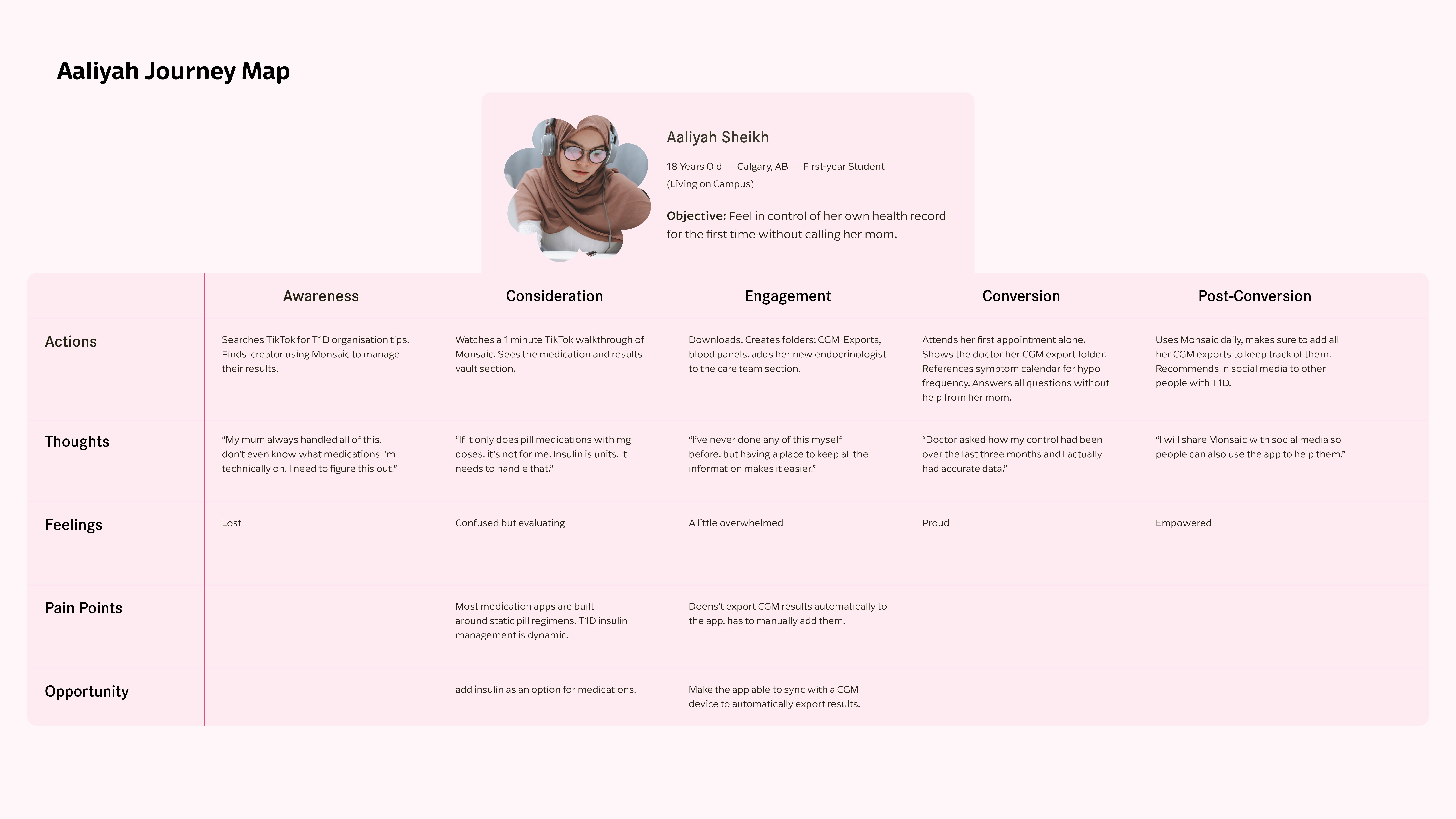
Roughly half of Canadian adults live with at least one major chronic disease, and recent data from Ontario suggests the prevalence of chronic conditions is rising among adolescents and young adults.
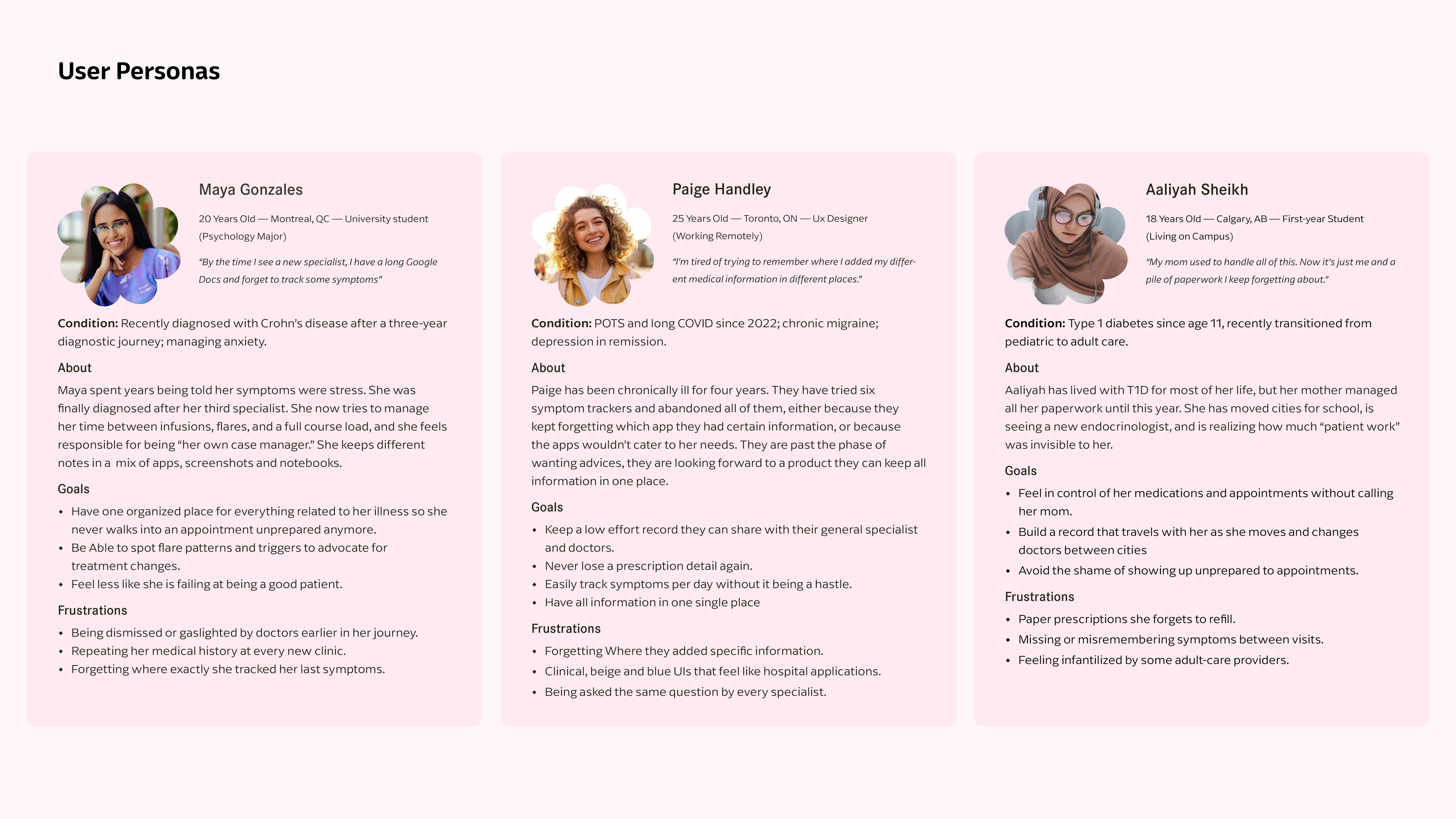
Digitally fluent Canadians in their late teens, twenties and early thirties who are managing long-term physical illness alongside significant mental health load, often while navigating education, early careers, and the transition from pediatric to adult healthcare are struggling to keep control of their symptoms, and existing chronic illness applications solve part of the problem well, but none combines easy symptom journaling, a test-results section, and structured prescription management in a product designed visually and emotionally for young adults to help them navigate their chronic illness.
The strategic opportunity is a branded, youth first companion app that can help young adults keep a journal of their symptoms and life, organize their health paperwork, keep prescriptions up to date all in one application for users to be able to attend doctor’s appointments prepared, advocate for themselves, and feel less alone in their journey.

Brand Development
The brand aims to make users feel respected and empowered without defining them by their illness.
The tone of the brand is bold and friendly, but without forced positivity. Even though the branding contains a vibrant pink and a strong burgundy to bring boldness, empowerement, feminity and confidence they are complemented by softer tones and hues to avoid eye strain and bring the feeling of calmness. The accent colour palette introduces colours that convey stability, trust, and maturity. Using this combination helps the brand avoid feeling overly playful.
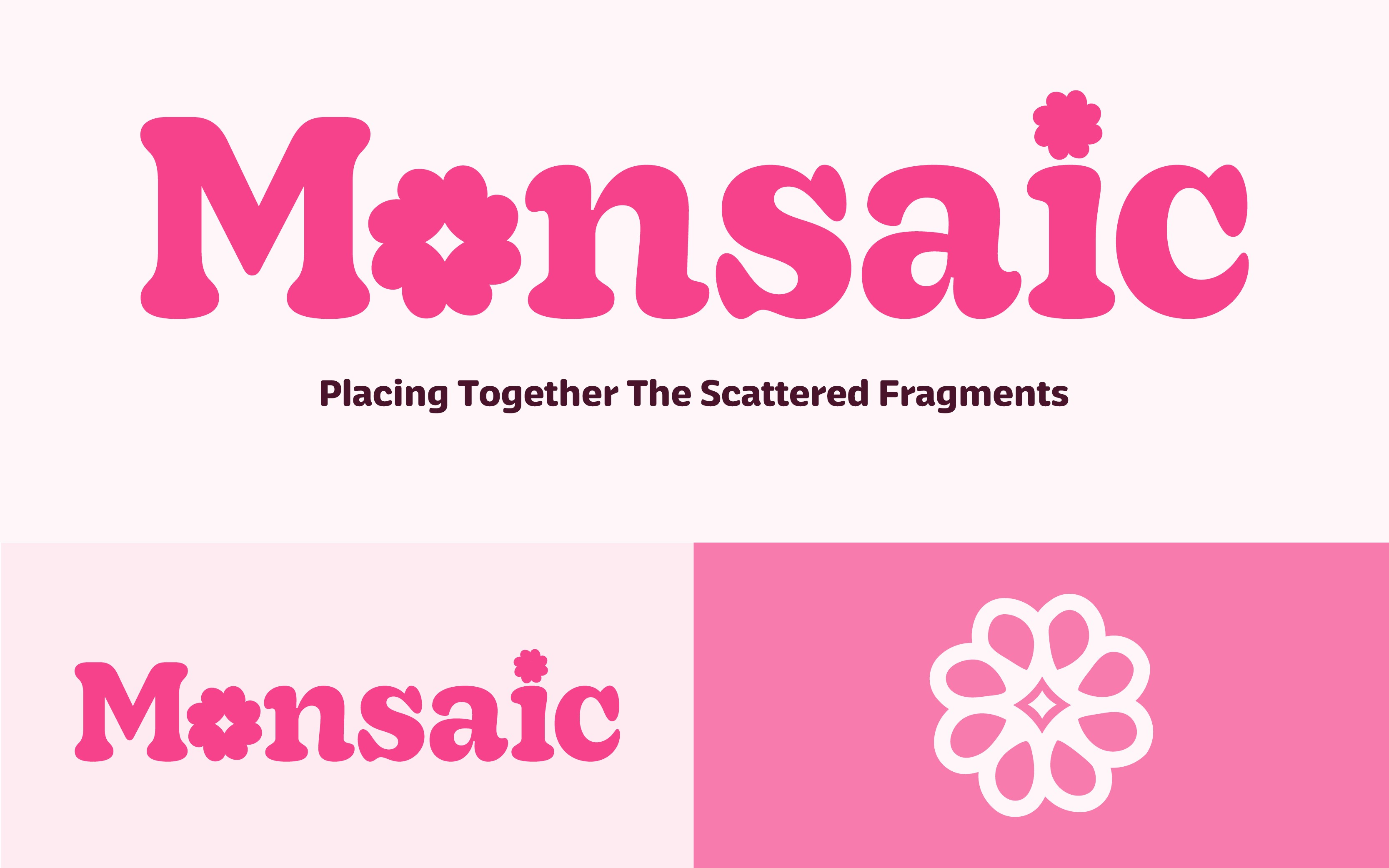
The name Monsaic was inspired from "Mosaic" which consists of patterns or images made from small regular or irregular pieces of coloured stone, glass, or ceramic placed together to create art. Because Monsaic / Monsaïque is Canadian, I decided to incorporate the French word “Mon,” which translates to “My.” Combined, the meaning becomes “My Mosaic / Mon Monsaïque.” The idea reflects how every patient using the application gathers all of their pieces in one place, creating their own mosaic to feel more prepared for their appointments.


Application Design
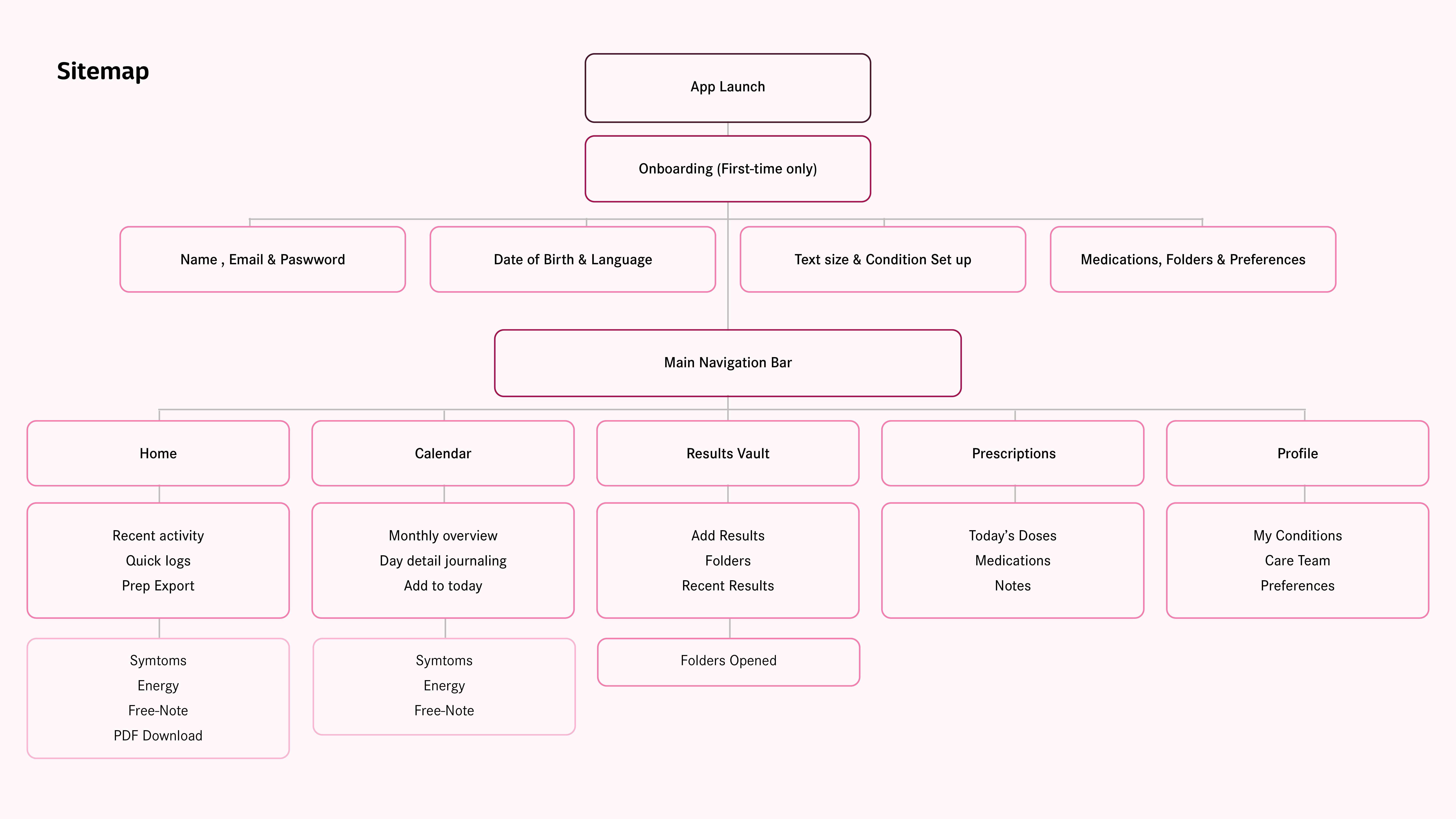
Monsaic was design to help users keep track of their records all in one application.
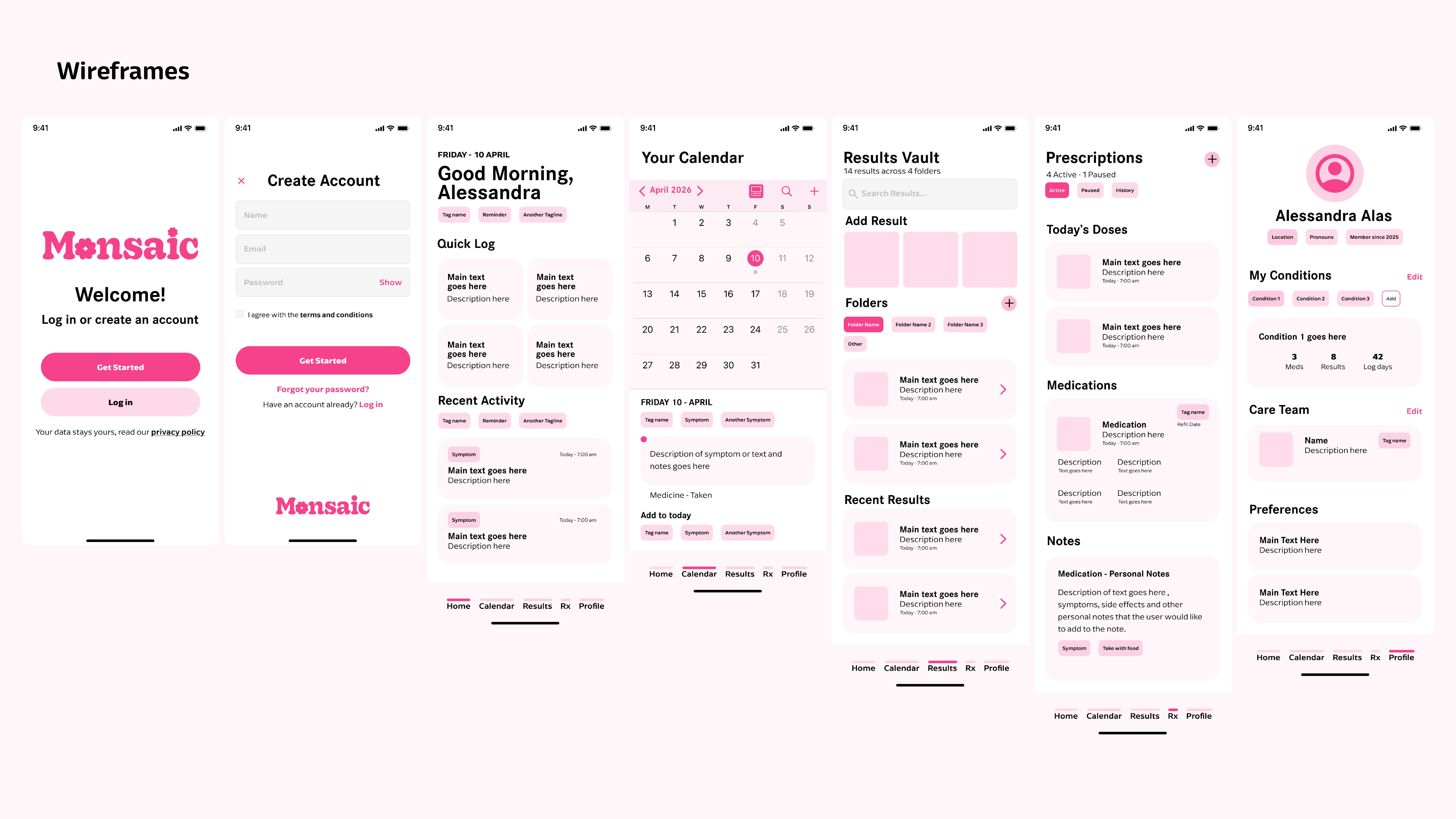
It is highly customizable, allowing users to create their own folders, notes, and add medications and care team members. It also includes easy, quick journaling with only a few clicks to log symptoms, energy levels, mood, and free notes for day-to-day tracking.
Homepage
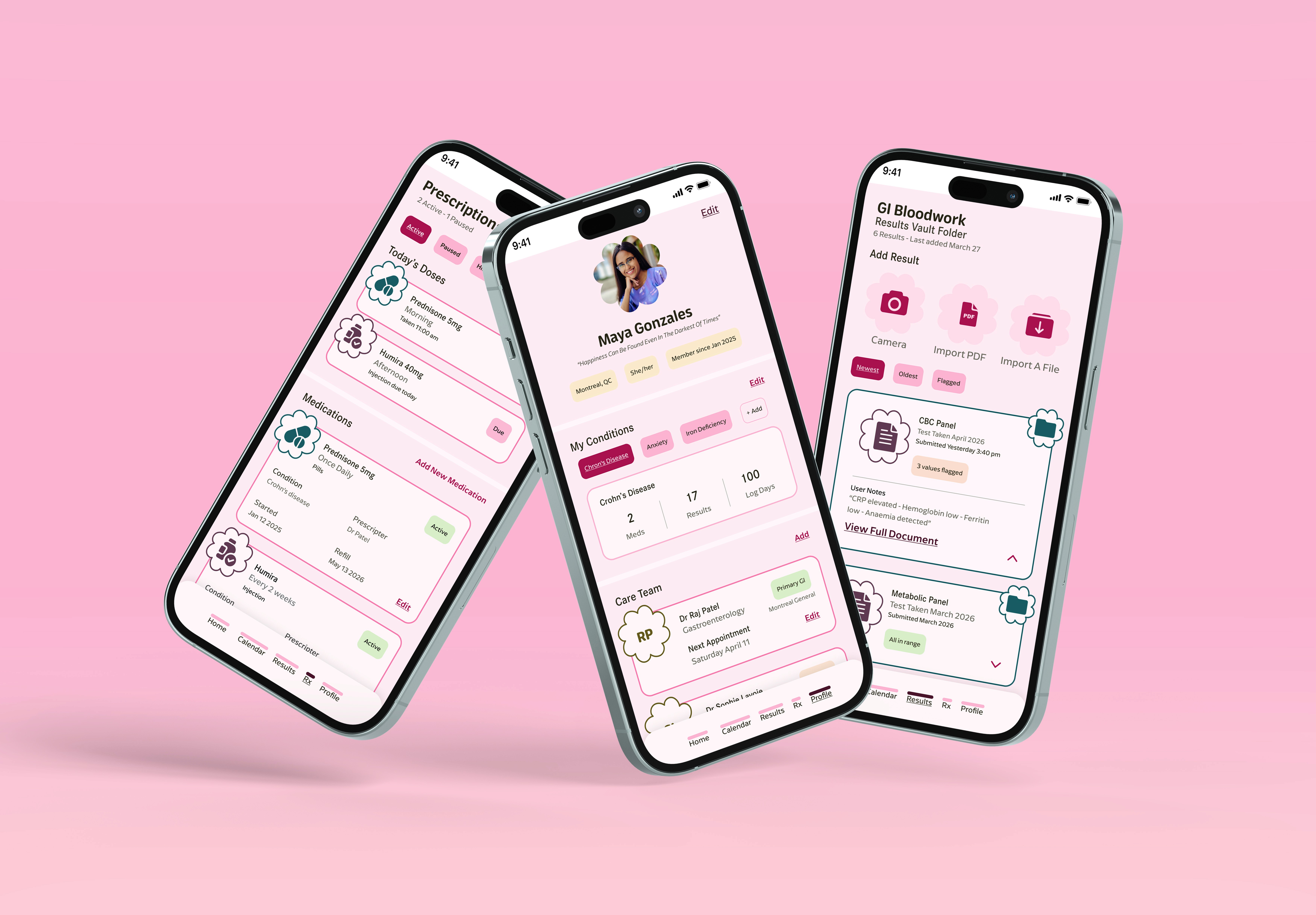
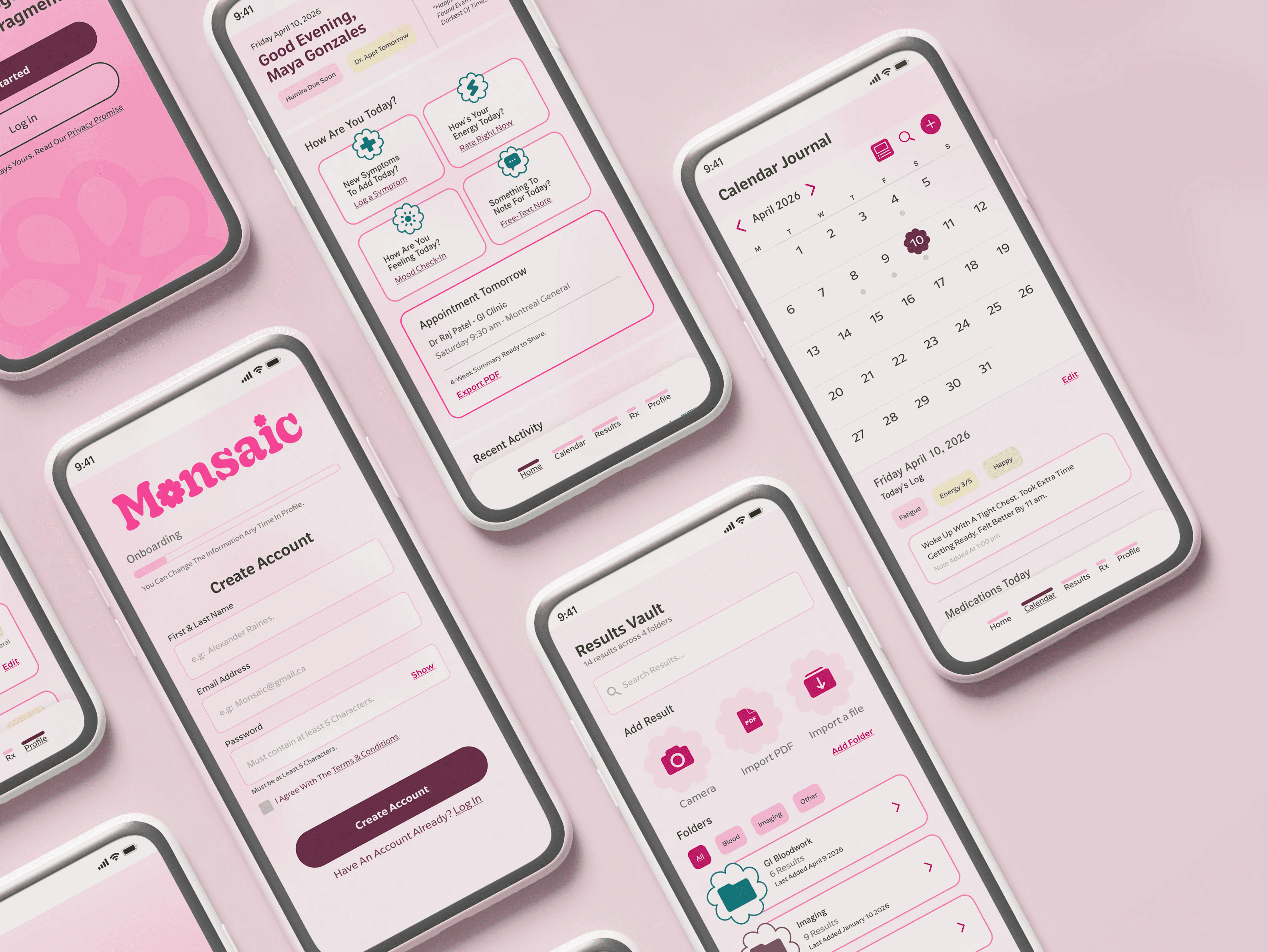
The homepage introduces a quick profile overview with a quote or phrase that users are free to add and customize. At the same time, it includes important tags such as medication status, overdue medications, and appointment reminders.
I decided to introduce quick logs as a way for users to easily journal their day-to-day experiences without needing to spend a lot of time on them. Users are able to log their symptoms, energy levels, and feelings in three simple clicks, and they can also add notes if they would like. The application will continuously save their most common symptoms so users do not need to rewrite them every time.
It also includes an appointment overview that constantly updates according to the user’s needs. With the help of a templated pattern library, Monsaic will be able to create a PDF containing the user’s most important insights for them to
download. Users can add appointment details through the Care Team section in their profile. Lastly, the homepage compiles users’ recent activity to help them remember the last information they added to their account and avoid entering duplicate information.
Calendar
The Calendar section is where users can access their daily journaling or review previous days. Their daily journal displays the symptoms, energy levels, and mood they added using the quick logs on the Homepage. The idea behind the quick logs was to make journaling much easier and faster, helping users to continue tracking their symptoms, mood and energy levels even on low- energy days or when experiencing brain fog.
Monsaic is able to detect patterns and notify users so they can bring them to their doctors’ attention. This helps users identify whether something specific may be causing the pattern, such as a medication, mood, or correlation with energy levels. The quick logs are added again at the bottom in case the user needs to include anything else for the day.
Results
The Results Vault is where users can create folders and add their specific results. This helps keep everything organized and stored in one place. Users can upload results by taking a photo, importing a PDF, or uploading files such as JPEGs, PNGs, Word documents, and more.
Once users create their folders and begin adding results, Monsaic will display a “Recent Results” section to help them remember the latest result uploaded to the app. After a result is added, users can include personal notes and tags such as “All in Range” or “3 Values Flagged,” depending on their needs. This helps users identify which results may be important to discuss with their doctors or review later.
Prescriptions
The Prescriptions section includes three parts: daily dosages, medications (where users are able to add new medications or
edit their current ones), and Side Effects & Notes, which they can customize according to their needs. By adding this information, Monsaic is able to create reminders accordingly.
Users can also let Monsaic know they have taken their medication by clicking the “Due” chip, which will then change to “Taken.” Monsaic will timestamp the time it was taken, helping to track patterns if needed.
Profile
The Profile section helps users customize the application to their needs. They are able to add or change their profile picture, as well as add customizable chips and quotes. Their conditions are also included in the Profile section, where they can add or edit them; Monsaic will generate insights for each condition added.
This section is also where users can add their care team to keep track of all their specialists and doctors. This is where they can enter future appointments so Monsaic can set reminders and know when to generate the templated PDF.
Conclusion
An easy-to-navigate application that helps users living with chronic illness keep track of all their information in one place, Monsaic not only helps users organize their data but also prepares them for upcoming appointments and pinpoints patterns to help users recognize triggers in their symptoms.
Monsaic aims to help users feel empowered by enabling them to advocate for themselves and feel prepared for their appointments. With all the information provided and insights created by Monsaic, users are better able to communicate their symptoms and experiences clearly.

more to explore.
more to explore.
Homepage
The homepage introduces a quick profile overview with a quote or phrase that users are free to add and customize. At the same time, it includes important tags such as medication status, overdue medications, and appointment reminders.
I decided to introduce quick logs as a way for users to easily journal their day-to-day experiences without needing to spend a lot of time on them. Users are able to log their symptoms, energy levels, and feelings in three simple clicks, and they can also add notes if they would like. The application will continuously save their most common symptoms so users do not need to rewrite them every time.
It also includes an appointment overview that constantly updates according to the user’s needs. With the help of a templated pattern library, Monsaic will be able to create a PDF containing the user’s most important insights for them to download. Users can add appointment details through the Care Team section in their profile. Lastly, the homepage compiles users’ recent activity to help them remember the last information they added to their account and avoid entering duplicate information.
Calendar
The Calendar section is where users can access their daily journaling or review previous days. Their daily journal displays the symptoms, energy levels, and mood they added using the quick logs on the homepage. The idea behind the quick logs was to make journaling much easier and faster, helping users continue tracking their symptoms, mood and energy levels even on low- energy days or when experiencing brain fog.
Monsaic is able to detect patterns and notify users so they can bring them to their doctors’ attention. This helps users identify whether something specific may be causing the pattern, such as a medication, mood, or correlation with energy levels.
At the end of the page, the quick logs are added again in case the user needs to include anything else for the day.
Results
The Results Vault is where users can create folders and add their specific results. This helps keep everything organized and stored
in one place. Users can upload results by taking a photo, importing a PDF, or uploading files such as JPEGs, PNGs, Word documents, and more.
Once users create their folders and begin adding results, Monsaic will display a “Recent Results” section to help them remember the latest result uploaded to the app. After a result is added, users can include personal notes and tags such as “All in Range” or “3 Values Flagged,” depending on their needs. This helps users identify which results may be important to discuss with their doctors or review later.
Prescriptions
The Prescriptions section includes three parts: daily dosages, medications (where users are able to add new medications or edit their current ones), and Side Effects & Notes, which they can customize according to their needs. By adding this information, Monsaic is able to create reminders accordingly.
Users can also let Monsaic know they have taken their medication by clicking the “Due” chip, which will then change to “Taken.” Monsaic will timestamp the time it was taken, helping to track patterns if needed.
Profile
The Profile section helps users customize the application to their needs. They are able to add or change their profile picture, as well as add customizable chips and quotes. Their conditions are also included in the Profile section, where they can add or edit them; Monsaic will generate insights for each condition added.
This section is also where users can add their care team to keep track of all their specialists and doctors. This is where they can enter future appointments so Monsaic can set reminders and know when to generate the templated PDF
YEAR:
April 2026
PROJECT:
Personal Project
TOOLS:
Illustrator, Figma & InDesign
Monsaic: Chronic Illness Management App
Application Design
Monsaic was design to help users keep track of their records all in one application.
It is highly customizable, allowing users to create their own folders, notes, and add medications and care team members. It also includes easy, quick journaling with only a few clicks to log symptoms, energy levels, mood, and free notes for day-to-day tracking.
Connect to Content
Add layers or components to swipe between.
Homepage
The homepage introduces a quick profile overview with a quote or phrase that users are free to add and customize. At the same time, it includes important tags such as medication status, overdue medications, and appointment reminders.
I decided to introduce quick logs as a way for users to easily journal their day-to-day experiences without needing to spend a lot of time on them. Users are able to log their symptoms, energy levels, and feelings in three simple clicks, and they can also add notes if they would like. The application will continuously save their most common symptoms so users do not need to rewrite them every time.
It also includes an appointment overview that constantly updates according to the user’s needs. With the help of a templated pattern library, Monsaic will be able to create a PDF containing the user’s most important insights for them to download. Users can add appointment details through the Care Team section in their profile. Lastly, the homepage compiles users’ recent activity to help them remember the last information they added to their account and avoid entering duplicate information.
Calendar
The Calendar section is where users can access their daily journaling or review previous days. Their daily journal displays the symptoms, energy levels, and mood they added using the quick logs on the homepage. The idea behind the quick logs was to make journaling much easier and faster, helping users continue tracking their symptoms, mood and energy levels even on low- energy days or when experiencing brain fog.
Monsaic is able to detect patterns and notify users so they can bring them to their doctors’ attention. This helps users identify whether something specific may be causing the pattern, such as a medication, mood, or correlation with energy levels.
At the end of the page, the quick logs are added again in case the user needs to include anything else for the day.
Results
The Results Vault is where users can create folders and add their specific results. This helps keep everything organized and stored
in one place. Users can upload results by taking a photo, importing a PDF, or uploading files such as JPEGs, PNGs, Word documents, and more.
Once users create their folders and begin adding results, Monsaic will display a “Recent Results” section to help them remember the latest result uploaded to the app. After a result is added, users can include personal notes and tags such as “All in Range” or “3 Values Flagged,” depending on their needs. This helps users identify which results may be important to discuss with their doctors or review later.
Homepage
The homepage introduces a quick profile overview with a quote or phrase that users are free to add and customize. At the same time, it includes important tags such as medication status, overdue medications, and appointment reminders.
I decided to introduce quick logs as a way for users to easily journal their day-to-day experiences without needing to spend a lot of time on them. Users are able to log their symptoms, energy levels, and feelings in three simple clicks, and they can also add notes if they would like. The application will continuously save their most common symptoms so users do not need to rewrite them every time.
It also includes an appointment overview that constantly updates according to the user’s needs. With the help of a templated pattern library, Monsaic will be able to create a PDF containing the user’s most important insights for them to download. Users can add appointment details through the Care Team section in their profile. Lastly, the homepage compiles users’ recent activity to help them remember the last information they added to their account and avoid entering duplicate information.
Calendar
The Calendar section is where users can access their daily journaling or review previous days. Their daily journal displays the symptoms, energy levels, and mood they added using the quick logs on the homepage. The idea behind the quick logs was to make journaling much easier and faster, helping users continue tracking their symptoms, mood and energy levels even on low- energy days or when experiencing brain fog.
Monsaic is able to detect patterns and notify users so they can bring them to their doctors’ attention. This helps users identify whether something specific may be causing the pattern, such as a medication, mood, or correlation with energy levels.
At the end of the page, the quick logs are added again in case the user needs to include anything else for the day.
Homepage
The homepage introduces a quick profile overview with a quote or phrase that users are free to add and customize. At the same time, it includes important tags such as medication status, overdue medications, and appointment reminders.
I decided to introduce quick logs as a way for users to easily journal their day-to-day experiences without needing to spend a lot of time on them. Users are able to log their symptoms, energy levels, and feelings in three simple clicks, and they can also add notes if they would like. The application will continuously save their most common symptoms so users do not need to rewrite them every time.
It also includes an appointment overview that constantly updates according to the user’s needs. With the help of a templated pattern library, Monsaic will be able to create a PDF containing the user’s most important insights for them to download. Users can add appointment details through the Care Team section in their profile. Lastly, the homepage compiles users’ recent activity to help them remember the last information they added to their account and avoid entering duplicate information.


Conclusion
An easy-to-navigate application that helps users living with chronic illness keep track of all their information in one place, Monsaic not only helps users organize their data but also prepares them for upcoming appointments and pinpoints patterns to help users recognize triggers in their symptoms.
Monsaic aims to help users feel empowered by enabling them to advocate for themselves and feel prepared for their appointments. With all the information provided and insights created by Monsaic, users are better able to communicate their symptoms and experiences clearly.
about.
Roughly half of Canadian adults live with at least one major chronic disease, and recent data from Ontario suggests the prevalence of chronic conditions is rising among adolescents and young adults.
Digitally fluent Canadians in their late teens, twenties and early thirties who are managing long-term physical illness alongside significant mental health load, often while navigating education, early careers, and the transition from pediatric to adult healthcare are struggling to keep control of their symptoms, and existing chronic illness applications solve part of the problem well, but none combines easy symptom journaling, a test-results section, and structured prescription management in a product designed visually and emotionally for young adults to help them navigate their chronic illness.
The strategic opportunity is a branded, youth first companion app that can help young adults keep a journal of their symptoms and life, organize their health paperwork, keep prescriptions up to date all in one application for users to be able to attend doctor’s appointments prepared, advocate for themselves, and feel less alone in their journey.
Brand Development
The brand aims to make users feel respected and empowered without defining them by their illness.
The tone of the brand is bold and friendly, but without forced positivity. Even though the branding contains a vibrant pink and a strong burgundy to bring boldness, empowerement, feminity and confidence they are complemented by softer tones and hues to avoid eye strain and bring the feeling of calmness. The accent colour palette introduces colours that convey stability, trust, and maturity. Using this combination helps the brand avoid feeling overly playful.
The name Monsaic was inspired from "Mosaic" which consists of patterns or images made from small regular or irregular pieces of coloured stone, glass, or ceramic placed together to create art. Because Monsaic / Monsaïque is Canadian, I decided to incorporate the French word “Mon,” which translates to “My.” Combined, the meaning becomes “My Mosaic / Mon Monsaïque.” The idea reflects how every patient using the application gathers all of their pieces in one place, creating their own mosaic to feel more prepared for their appointments.

YEAR:
April 2026
PROJECT:
Personal Project
TOOLS:
Illustrator, Figma & InDesign
Monsaic: Chronic Illness Management App
Brand Development
The brand aims to make users feel respected and empowered without defining them by their illness.
The tone of the brand is bold and friendly, but without forced positivity. Even though the branding contains a vibrant pink and a strong burgundy to bring boldness, empowerement, feminity and confidence they are complemented by softer tones and hues to avoid eye strain and bring the feeling of calmness. The accent colour palette introduces colours that convey stability, trust, and maturity. Using this combination helps the brand avoid feeling overly playful.
The name Monsaic was inspired from "Mosaic" which consists of patterns or images made from small regular or irregular pieces of coloured stone, glass, or ceramic placed together to create art. Because Monsaic / Monsaïque is Canadian, I decided to incorporate the French word “Mon,” which translates to “My.” Combined, the meaning becomes “My Mosaic / Mon Monsaïque.” The idea reflects how every patient using the application gathers all of their pieces in one place, creating their own mosaic to feel more prepared for their appointments.


Homepage
The homepage introduces a quick profile overview that highlights important information. I decided to introduce quick logs as a way for users to easily journal their day-to-day experiences without needing to spend a lot of time on them this way users are able to log their symptoms, energy levels, and feelings in three simple clicks, they can also add notes if they would like. The application will continuously save their most common symptoms so users do not need to rewrite them every time.
It also includes an appointment overview that constantly updates according to the user’s needs. With the help of a templated pattern library, Monsaic will be able to create a PDF containing the user’s most important insights for them to download. At the end it compiles users’ recent activity of last updated added to avoid duplicated information.
Calendar
The Calendar section is where users can access their daily journaling or review previous days. Their daily journal displays the symptoms, energy levels, and mood they added using the quick logs on the Homepage. The idea behind the quick logs was to make journaling much easier and faster, helping users to continue tracking their symptoms, mood and energy levels even on low- energy days or when experiencing brain fog.
Monsaic is able to detect patterns and notify users so they can bring them to their doctors’ attention. This helps users identify whether something specific may be causing the pattern, such as a medication, mood, or correlation with energy levels. The quick logs are added again at the bottom in case the user needs to include anything else for the day.
Results
The Results Vault is where users can create folders and add their specific results. This helps keep everything organized and stored in one place. Users can upload results by taking a photo, importing a PDF, or uploading files such as JPEGs, PNGs, Word documents, and more.
Once users create their folders and begin adding results, Monsaic will display a “Recent Results” section to help them remember the latest result uploaded to the app. After a result is added, users can include personal notes and tags such as “All in Range” or “3 Values Flagged,” depending on their needs. This helps users identify which results
Prescriptions
The Prescriptions section includes three parts: daily dosages, medications (where users are able to add new medications or
edit their current ones), and Side Effects & Notes, which they can customize according to their needs. By adding this information,
Monsaic is able to create reminders accordingly.
Users can also let Monsaic know they have taken their medication by clicking the “Due” chip, which will then change to “Taken.” Monsaic will timestamp the time it was taken, helping to track patterns if needed.
Profile
The Profile section helps users customize the application to their needs. They are able to add or change their profile picture, as well as add customizable chips and quotes. Their conditions are also included in the Profile section, where they can add or edit them; Monsaic will generate insights for each condition added.
This section is also where users can add their care team to keep track of all their specialists and doctors. This is where they can enter future appointments so Monsaic can set reminders and know when to generate the templated PDF.

about.
Roughly half of Canadian adults live with at least one major chronic disease, and recent data from Ontario suggests the prevalence of chronic conditions is rising among adolescents and young adults.
Digitally fluent Canadians in their late teens, twenties and early thirties who are managing long-term physical illness alongside significant mental health load, often while navigating education, early careers, and the transition from pediatric to adult healthcare are struggling to keep control of their symptoms, and existing chronic illness applications solve part of the problem well, but none combines easy symptom journaling, a test-results section, and structured prescription management in a product designed visually and emotionally for young adults to help them navigate their chronic illness.
The strategic opportunity is a branded, youth first companion app that can help young adults keep a journal of their symptoms and life, organize their health paperwork, keep prescriptions up to date all in one application for users to be able to attend doctor’s appointments prepared, advocate for themselves, and feel less alone in their journey.
Homepage
The homepage introduces a quick profile overview that highlights important information. I decided to introduce quick logs as a way for users to easily journal their day-to-day experiences without needing to spend a lot of time on them this way users are able to log their symptoms, energy levels, and feelings in three simple clicks, they can also add notes if they would like. The application will continuously save their most common symptoms so users do not need to rewrite them every time.
It also includes an appointment overview that constantly updates according to the user’s needs. With the help of a templated pattern library, Monsaic will be able to create a PDF containing the user’s most important insights for them to download. At the end it compiles users’ recent activity of last updated added to avoid duplicated information.
Homepage
The homepage introduces a quick profile overview that highlights important information. I decided to introduce quick logs as a way for users to easily journal their day-to-day experiences without needing to spend a lot of time on them this way users are able to log their symptoms, energy levels, and feelings in three simple clicks, they can also add notes if they would like. The application will continuously save their most common symptoms so users do not need to rewrite them every time.
It also includes an appointment overview that constantly updates according to the user’s needs. With the help of a templated pattern library, Monsaic will be able to create a PDF containing the user’s most important insights for them to download. At the end it compiles users’ recent activity of last updated added to avoid duplicated information.
Application Design
Monsaic was design to help users keep track of their records all in one application.
It is highly customizable, allowing users to create their own folders, notes, and add medications and care team members. It also includes easy, quick journaling with only a few clicks to log symptoms, energy levels, mood, and free notes for day-to-day tracking.
Homepage
The homepage introduces a quick profile overview that highlights important information. I decided to introduce quick logs as a way for users to easily journal their day-to-day experiences without needing to spend a lot of time on them this way users are able to log their symptoms, energy levels, and feelings in three simple clicks, they can also add notes if they would like. The application will continuously save their most common symptoms so users do not need to rewrite them every time.
It also includes an appointment overview that constantly updates according to the user’s needs. With the help of a templated pattern library, Monsaic will be able to create a PDF containing the user’s most important insights for them to download. At the end it compiles users’ recent activity of last updated added to avoid duplicated information.
Calendar
The Calendar section is where users can access their daily journaling or review previous days. Their daily journal displays the symptoms, energy levels, and mood they added using the quick logs on the Homepage. The idea behind the quick logs was to make journaling much easier and faster, helping users to continue tracking their symptoms, mood and energy levels even on low- energy days or when experiencing brain fog.
Monsaic is able to detect patterns and notify users so they can bring them to their doctors’ attention. This helps users identify whether something specific may be causing the pattern, such as a medication, mood, or correlation with energy levels. The quick logs are added again at the bottom in case the user needs to include anything else for the day.
Homepage
The homepage introduces a quick profile overview that highlights important information. I decided to introduce quick logs as a way for users to easily journal their day-to-day experiences without needing to spend a lot of time on them this way users are able to log their symptoms, energy levels, and feelings in three simple clicks, they can also add notes if they would like. The application will continuously save their most common symptoms so users do not need to rewrite them every time.
It also includes an appointment overview that constantly updates according to the user’s needs. With the help of a templated pattern library, Monsaic will be able to create a PDF containing the user’s most important insights for them to download. At the end it compiles users’ recent activity of last updated added to avoid duplicated information.
Homepage
The homepage introduces a quick profile overview that highlights important information. I decided to introduce quick logs as a way for users to easily journal their day-to-day experiences without needing to spend a lot of time on them this way users are able to log their symptoms, energy levels, and feelings in three simple clicks, they can also add notes if they would like. The application will continuously save their most common symptoms so users do not need to rewrite them every time.
It also includes an appointment overview that constantly updates according to the user’s needs. With the help of a templated pattern library, Monsaic will be able to create a PDF containing the user’s most important insights for them to download. At the end it compiles users’ recent activity of last updated added to avoid duplicated information.
Homepage
The homepage introduces a quick profile overview that highlights important information. I decided to introduce quick logs as a way for users to easily journal their day-to-day experiences without needing to spend a lot of time on them this way users are able to log their symptoms, energy levels, and feelings in three simple clicks, they can also add notes if they would like. The application will continuously save their most common symptoms so users do not need to rewrite them every time.
It also includes an appointment overview that constantly updates according to the user’s needs. With the help of a templated pattern library, Monsaic will be able to create a PDF containing the user’s most important insights for them to download. At the end it compiles users’ recent activity of last updated added to avoid duplicated information.
Homepage
The homepage introduces a quick profile overview that highlights important information. I decided to introduce quick logs as a way for users to easily journal their day-to-day experiences without needing to spend a lot of time on them this way users are able to log their symptoms, energy levels, and feelings in three simple clicks, they can also add notes if they would like. The application will continuously save their most common symptoms so users do not need to rewrite them every time.
It also includes an appointment overview that constantly updates according to the user’s needs. With the help of a templated pattern library, Monsaic will be able to create a PDF containing the user’s most important insights for them to download. At the end it compiles users’ recent activity of last updated added to avoid duplicated information.
Homepage
The homepage introduces a quick profile overview that highlights important information. I decided to introduce quick logs as a way for users to easily journal their day-to-day experiences without needing to spend a lot of time on them this way users are able to log their symptoms, energy levels, and feelings in three simple clicks, they can also add notes if they would like. The application will continuously save their most common symptoms so users do not need to rewrite them every time.
It also includes an appointment overview that constantly updates according to the user’s needs. With the help of a templated pattern library, Monsaic will be able to create a PDF containing the user’s most important insights for them to download. At the end it compiles users’ recent activity of last updated added to avoid duplicated information.
Homepage
The homepage introduces a quick profile overview that highlights important information. I decided to introduce quick logs as a way for users to easily journal their day-to-day experiences without needing to spend a lot of time on them this way users are able to log their symptoms, energy levels, and feelings in three simple clicks, they can also add notes if they would like. The application will continuously save their most common symptoms so users do not need to rewrite them every time.
It also includes an appointment overview that constantly updates according to the user’s needs. With the help of a templated pattern library, Monsaic will be able to create a PDF containing the user’s most important insights for them to download. At the end it compiles users’ recent activity of last updated added to avoid duplicated information.
Homepage
The homepage introduces a quick profile overview that highlights important information. I decided to introduce quick logs as a way for users to easily journal their day-to-day experiences without needing to spend a lot of time on them this way users are able to log their symptoms, energy levels, and feelings in three simple clicks, they can also add notes if they would like. The application will continuously save their most common symptoms so users do not need to rewrite them every time.
It also includes an appointment overview that constantly updates according to the user’s needs. With the help of a templated pattern library, Monsaic will be able to create a PDF containing the user’s most important insights for them to download. At the end it compiles users’ recent activity of last updated added to avoid duplicated information.
Homepage
The homepage introduces a quick profile overview that highlights important information. I decided to introduce quick logs as a way for users to easily journal their day-to-day experiences without needing to spend a lot of time on them this way users are able to log their symptoms, energy levels, and feelings in three simple clicks, they can also add notes if they would like. The application will continuously save their most common symptoms so users do not need to rewrite them every time.
It also includes an appointment overview that constantly updates according to the user’s needs. With the help of a templated pattern library, Monsaic will be able to create a PDF containing the user’s most important insights for them to download. At the end it compiles users’ recent activity of last updated added to avoid duplicated information.
Conclusion
An easy-to-navigate application that helps users living with chronic illness keep track of all their information in one place, Monsaic not only helps users organize their data but also prepares them for upcoming appointments and pinpoints patterns to help users recognize triggers in their symptoms.
Monsaic aims to help users feel empowered by enabling them to advocate for themselves and feel prepared for their appointments. With all the information provided and insights created by Monsaic, users are better able to communicate their symptoms and experiences clearly.